A PLACE FOR EVERY PART OF LIFE Everything has a home. Explore media, household tools, inventory and more. Open any card for what it does, a preview and its current development scope.
Development build: implementation found in the reviewed source. Partial: some workflow exists, with unfinished parts. Planned: a complete workflow was not established. These labels do not certify live operation or change the proposed plan entitlements.
A DIGITAL HOME, ROOM BY ROOM More of everyday life.In one place. Explore the workflows already taking shape in the development build, alongside the parts still being completed.
Watch, read and listen Movies and episodes, creator archives, ebooks and audiobook chapters. Keep your place and return through dedicated libraries.
Bring the household together Review a photographed work schedule before adding shifts to your calendar. Save recipes with ingredients and directions, and keep people and pets close.
Know what you own Catalog household items and electronics. Give trading cards a home in binders and decks, with supported identification and price tools.
Find it. Add it. Keep it. Use Global Search and guided intake, correct metadata matches, browse photo albums and manage files in your server’s local workspace.
Make the view your own Choose visible libraries, customize supported artwork and backgrounds, and arrange movies, TV and books into your preferred sequence.
Connect and extend Stage and manage compatible plugins, connect supported media services and track background work. Local model adapters provide an AI foundation; wider assistant workflows remain in development.
Search features All Core Media Live TV & DVR Family Inventory AI Automation Plugins Users & permissions Customization Support Developer features Cloud
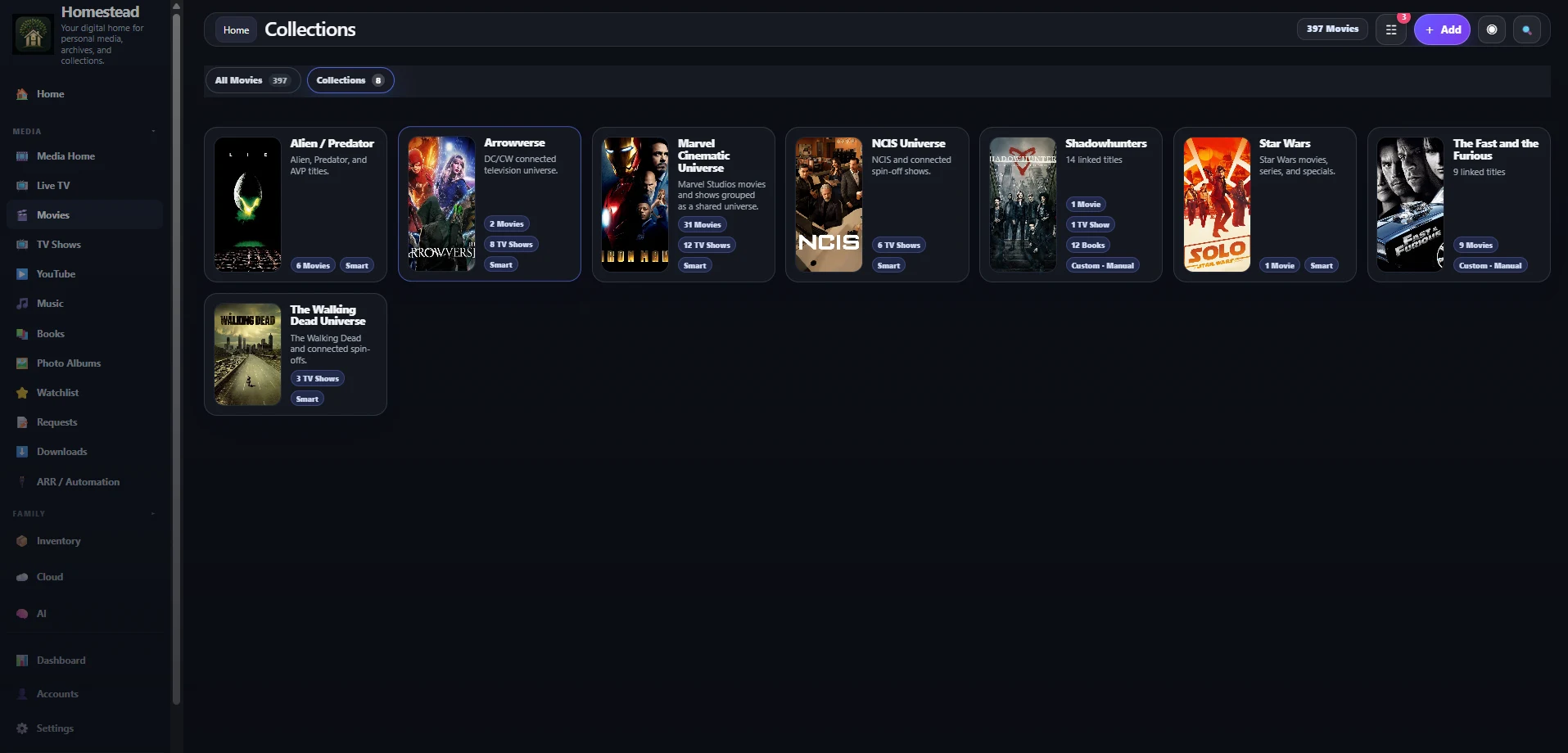
94 features · Source-reviewed scope · Release readiness varies E Development build External-source search Search configured Seerr, YouTube and acquisition sources alongside your local results. Core Pro · Draft inclusion Explore feature G Development build Global Search Find local media from a shared search entry point, with separate result groups for configured external sources. Core Free core · Draft inclusion Explore feature G Development build Global Add Add media and household records through a context-aware menu and guided intake workflow. Core Free core · Draft inclusion Explore feature L Development build Local-first architecture Run the application against libraries and data stored on your own server. Core Free core · Draft inclusion Explore feature U Partial Unified dashboard Return to recent media, saved progress, requests and library shortcuts from one home screen. Core Free core · Draft inclusion Explore feature W Development build Watchlists and Watch Later Save titles for later and maintain named watchlists without creating a paid collection. Media Free core · Draft inclusion Explore feature L Development build Library visibility Choose which libraries appear in your interface, including optional personal libraries. Media Free core · Draft inclusion Explore feature O Development build Optional adult-media libraries Keep optional adult-media libraries organized with profile details, artwork and metadata tools. Media Pro · Draft inclusion Explore feature C Partial CPU and GPU transcoding Play supported media directly or use the server’s FFmpeg compatibility conversion when needed. Media Free core · Draft inclusion Explore feature S Planned Skip Intro and Skip Credits Planned playback shortcuts; tier assignment is not finalized. Media Tier allocation pending Explore feature O Planned Offline downloads Save supported media to supported clients for offline use. Media Tier allocation pending Explore feature W Planned Watch Together Future synchronized playback with household members. Media Tier allocation pending Explore feature M Development build Media requests See media requests and availability with separate download and import progress. Media Pro · Draft inclusion Explore feature M Development build Movies Browse movie artwork, open cast and title details, correct metadata matches and resume playback. Media Free core · Draft inclusion Explore feature T Development build TV shows Browse series, seasons and episodes with title matching, playback progress and shared collections. Media Free core · Draft inclusion Explore feature M Development build Music Explore artists, albums and tracks, then keep music playing in a persistent audio queue. Media Free core · Draft inclusion Explore feature B Development build Books Browse by author or series, inspect book details, and read supported ebooks in the app. Media Free core · Draft inclusion Explore feature A Development build Audiobooks Listen to local audiobook files with a chapter queue and saved listening progress in the audio player. Media Free core · Draft inclusion Explore feature I Development build Import a watch or reading order Import a watch order from a URL or pasted text, match rows to your library and edit the saved sequence. Media Free core · Draft inclusion Explore feature Y Development build YouTube library Browse archived videos by creator, series and season, with dedicated collections and custom series artwork. Media Free core · Draft inclusion Explore feature C Development build Cross-media collections Mix movies, TV shows and books, choose their exact order and keep custom ordering as smart membership updates. Media Free core · Draft inclusion Explore feature S Development build Streaming Play supported local video and audio with shared player controls and progress tracking. Media Free core · Draft inclusion Explore feature L Development build Library management Organize distinct media libraries, scan mapped folders and correct metadata and artwork. Media Free core · Draft inclusion Explore feature C Development build Continue watching and listening Return to saved video or audio progress and use supported playback queues. Media Free core · Draft inclusion Explore feature M Development build Metadata and artwork matching Correct title matches and choose artwork for supported movies, TV, books and music. Media Free core · Draft inclusion Explore feature E Development build Episode-by-episode watch orders Arrange individual episodes, movies and books into a saved sequence using the watch-order editor. Media Free core · Draft inclusion Explore feature P Development build Photo albums Browse scanned photo albums, open images and personalize supported album artwork. Media Free core · Draft inclusion Explore feature M Development build Mobile browser experience Reach libraries through responsive mobile navigation and supported browser playback. Media Free core · Draft inclusion Explore feature L Development build Live TV Browse configured M3U or Xtream channels with XMLTV guide information and supported playback. Live TV & DVR Pro · Draft inclusion Explore feature D Partial DVR recordings Browse recordings already present in a configured recording folder. Live TV & DVR Pro · Draft inclusion Explore feature H Development build Household profiles Keep household people and their related photos, videos and profile details together. Family Family · Draft inclusion Explore feature F Partial Family dashboard Use a family hub to reach profiles, pets, calendars and recipes. Family Family · Draft inclusion Explore feature P Development build Pets Browse pet profiles with scanned photos, videos, species, breed and other saved details. Family Family · Draft inclusion Explore feature C Development build Calendar Create and update household events and review imported schedules before adding them to the calendar. Family Family · Draft inclusion Explore feature R Development build Recipes Keep ingredients, directions, servings, preparation times and favorites in a recipe library. Family Family · Draft inclusion Explore feature F Partial Family documents Keep household files and profile information accessible from your digital home. Family Family · Draft inclusion Explore feature I Development build Import a work schedule Bring a schedule photo or PDF into a review screen, identify the relevant person and approve shifts for the calendar. Family Family · Draft inclusion Explore feature R Development build Recipe imports Preview recipes from a URL or photo, then edit ingredients and directions before saving. Family Family · Draft inclusion Explore feature F Planned Family tree A place for family relationships is part of the household direction. Family Family · Draft inclusion Explore feature B Development build Basic inventory Create inventory records, browse categories and retain item details through guided intake. Inventory Plus · Draft inclusion Explore feature I Development build Inventory categories Separate electronics, tools, collectibles, trading cards and outdoor items into useful views. Inventory Plus · Draft inclusion Explore feature B Partial Barcode support Use barcode and identification controls during supported item intake. Inventory Plus · Draft inclusion Explore feature I Partial Item documents Associate purchase and item information with inventory records. Inventory Plus · Draft inclusion Explore feature A Partial Advanced inventory Use richer inventory tools such as card binders, decks, identification and valuation requests. Inventory Plus · Draft inclusion Explore feature T Development build Trading cards, binders and decks Organize supported trading cards in binders and decks, with identification and price-refresh tools. Inventory Plus · Draft inclusion Explore feature E Development build Electronics intake Look up electronics and retain useful model and location details in your inventory. Inventory Plus · Draft inclusion Explore feature L Partial Local OCR Use local recognition tools in specific workflows such as schedule and trading-card intake. AI Pro · Draft inclusion Explore feature L Planned Local face recognition Organize your own photo library with supported local models. AI Pro · Draft inclusion Explore feature D Planned Duplicate detection and tagging Use local analysis to organize your own content. AI Pro · Draft inclusion Explore feature A Partial AI architecture Connect a model service that accepts conversation turns and structured tool descriptions. AI Pro · Draft inclusion Explore feature A Partial AI chat Use the model-service foundation for conversations with compatible configured providers. AI Pro · Draft inclusion Explore feature L Planned Library questions Ask about your configured library. AI Pro · Draft inclusion Explore feature M Planned Media recommendations Explore suggestions from your library. AI Pro · Draft inclusion Explore feature N Planned Natural-language search Find things using everyday language. AI Pro · Draft inclusion Explore feature H Planned Homestead actions A proposed way to request supported actions. AI Pro · Draft inclusion Explore feature A Planned AI automation Connect supported AI actions to workflows. AI Pro · Draft inclusion Explore feature L Partial Local model support Configure compatible self-hosted model providers, including the supplied Ollama adapter. AI Pro · Draft inclusion Explore feature A Planned Advanced models Additional model capabilities under consideration. AI Pro · Draft inclusion Explore feature M Planned Multi-step actions Coordinate a sequence of supported actions. AI Pro · Draft inclusion Explore feature M Partial Manual actions Trigger supported scans, metadata tasks and service actions from the app. Automation Pro · Draft inclusion Explore feature B Partial Basic integrations Configure service connections and inspect available status and task controls. Automation Pro · Draft inclusion Explore feature L Development build Library automation Watch configured library paths and refresh indexes when supported media changes. Automation Pro · Draft inclusion Explore feature S Partial Scheduled automation Use the existing library watcher and stored automation-rule foundation. Automation Pro · Draft inclusion Explore feature A Partial ARR actions Coordinate supported request, acquisition and status workflows through configured media services. Automation Pro · Draft inclusion Explore feature B Development build Background jobs Track long-running work and recover interrupted activity records when the server restarts. Automation Pro · Draft inclusion Explore feature A Partial Advanced workflows Store automation rules and view service-related workflow configuration. Automation Pro · Draft inclusion Explore feature A Planned AI-triggered actions Connect supported assistant requests to tasks. Automation Pro · Draft inclusion Explore feature C Partial Cross-service automation Follow supported request-to-download-to-import paths across configured services. Automation Pro · Draft inclusion Explore feature P Development build Plugin support Load optional modules through a plugin registry with client and server entry points. Plugins Pro · Draft inclusion Explore feature F Partial Free plugins Use the plugin installation foundation for compatible optional modules. Plugins Pro · Draft inclusion Explore feature P Planned Premium plugin support Support for separately licensed plugins. Plugins Pro · Draft inclusion Explore feature M Partial Marketplace access Browse a configured catalog, stage a package and confirm installation; enable, disable or remove installed plugins. Plugins Pro · Draft inclusion Explore feature T Partial Third-party plugins Extend the app through manifest-based client and server plugins. Plugins Pro · Draft inclusion Explore feature I Development build Install and manage plugins Stage a catalog package, confirm installation, and enable, disable or remove compatible modules. Plugins Pro · Draft inclusion Explore feature N Planned Number of users Household user limits are not finalized. Users & permissions Free core · Draft inclusion Explore feature U Development build User profiles Maintain separate sign-in accounts and saved personal display preferences. Users & permissions Free core · Draft inclusion Explore feature P Development build Permissions Configure roles, allowed libraries and supported access restrictions. Users & permissions Free core · Draft inclusion Explore feature P Planned Per-device access Manage access by device. Users & permissions Free core · Draft inclusion Explore feature A Planned Advanced permissions More detailed control for your household. Users & permissions Tier allocation pending Explore feature H Partial Household controls Configure child-account options and access to selected libraries. Users & permissions Free core · Draft inclusion Explore feature D Development build Default Homestead interface Use the default interface and responsive layouts to browse your home from supported browsers. Customization Free core · Draft inclusion Explore feature T Partial Themes Use existing appearance settings to change supported parts of your interface. Customization Plus · Draft inclusion Explore feature A Development build Appearance controls Customize supported library, series and collection views with dedicated appearance controls. Customization Plus · Draft inclusion Explore feature C Development build Custom backgrounds Choose artwork and upload backgrounds, with supported opacity, blur and brightness controls. Customization Plus · Draft inclusion Explore feature A Partial Advanced UI customization Use scoped appearance overrides for supported libraries, collections and series. Customization Plus · Draft inclusion Explore feature K Planned Kiosk customization A possible dedicated household display. Customization Plus · Draft inclusion Explore feature U Planned Updates Update policies will be published before release. Support Free core · Draft inclusion Explore feature R Planned Release channels Channel availability is not finalized. Support Free core · Draft inclusion Explore feature S Planned Support Support options are being defined. Support Free core · Draft inclusion Explore feature E Planned Early access Early access policies are under consideration. Support Tier allocation pending Explore feature A Partial API access The app already uses HTTP endpoints for libraries, records, accounts and plugin operations. Developer features Tier allocation pending Explore feature P Planned Plugin SDK Developer tooling is planned. Developer features Free core · Draft inclusion Explore feature Y Development build Your server’s file space Browse files, create folders, upload and download through a local file workspace. Cloud Plus · Draft inclusion Explore feature E Partial External cloud connections Keep provider configuration alongside your local file workspace. Cloud Plus · Draft inclusion Explore feature BEYOND A SINGLE LIBRARY Follow the story.Across every format. Bring movies, TV shows and books together in a collection you arrange yourself. Keep music and archived videos organized in their dedicated libraries.
Actual development build · Collection overview Your order makes sense here. Plan a release-order marathon, alternate a book with its adaptation, or curate your own sequence. Mixed movie, TV and book collections and manual ordering are implemented in the development source. Collections and watch orders are included in Free in 0.6.8.31.
Explore collections → Bring an order you found online. The development source accepts a URL or pasted watch-order text, parses the sequence and matches rows to local media. Edit the saved order to suit your library. Results depend on source formatting; importing an order does not download its media.
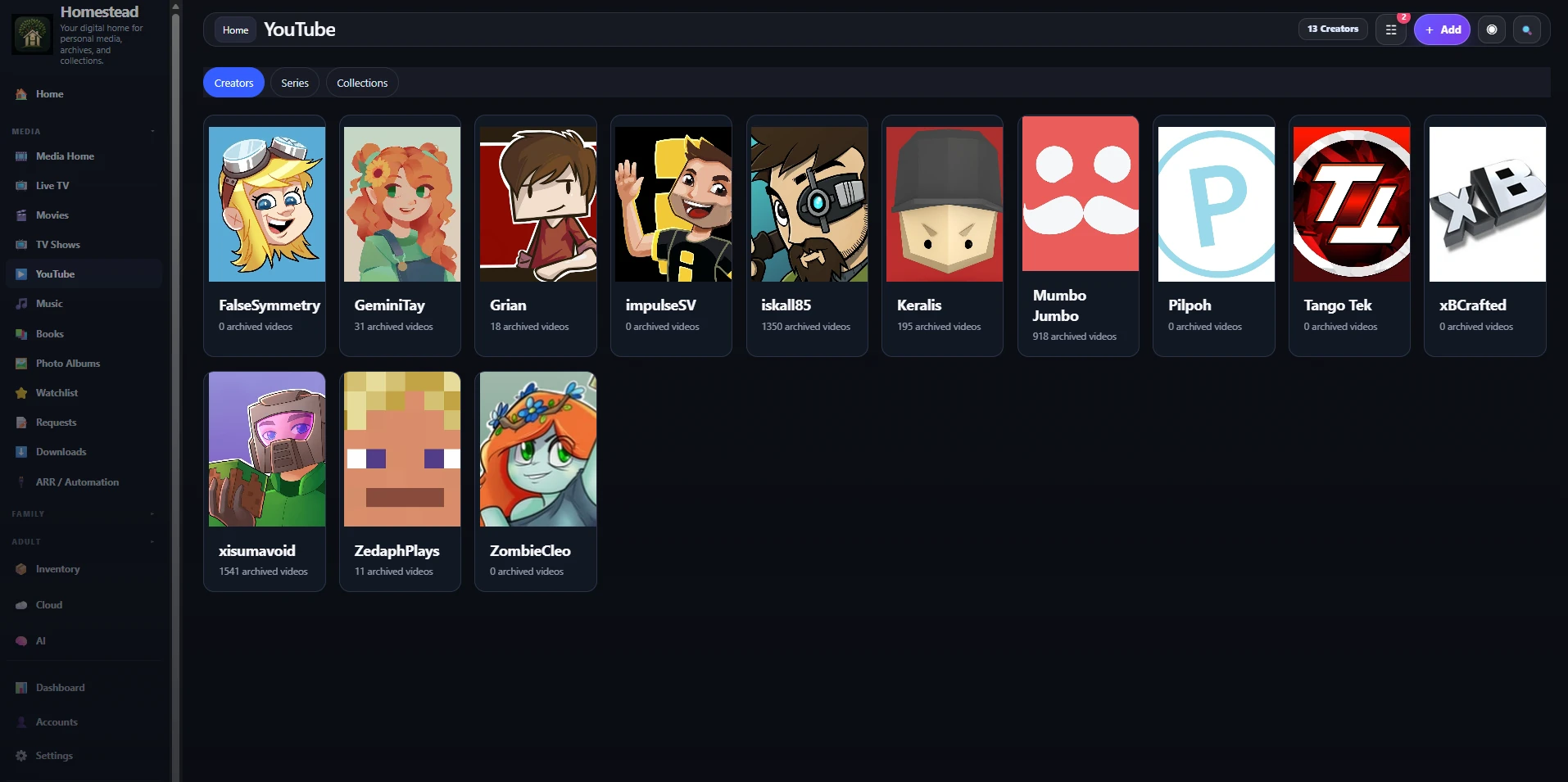
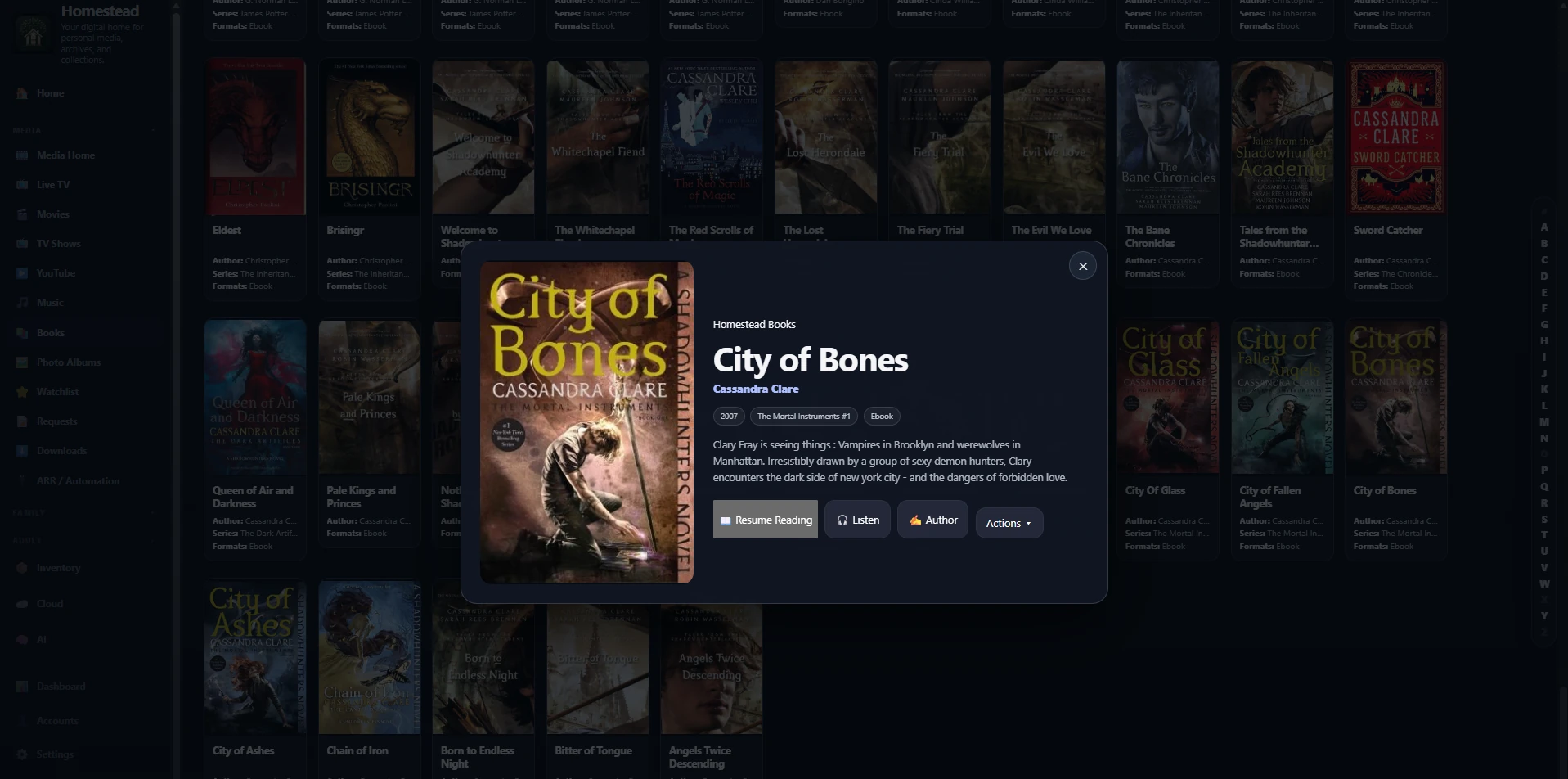
Explore watch-order imports → YouTube, with its own place. Browse creators and archived series in a dedicated library. Development screenshot.Reading belongs here, too. Keep books and author details close; audiobook files also connect to a listening queue. Development screenshot.Keep YouTube, books and music organized in their own libraries. Free includes organization, watchlists, collections and watch orders; Plus adds appearance controls. External integrations belong to Pro in the current draft.
How does this compare with Plex, Jellyfin and Emby? Collections and multiple media libraries are established features elsewhere: Plex documents collections , Jellyfin supports books , and Emby covers media and Live TV . Homestead brings cross-media organization together with family records, inventory and local AI. This is a product direction, not a claim that every individual capability is exclusive or already implemented.
All features and tier assignments are subject to change. Select any feature card above for its explanation, preview and draft availability.
Homestead is actively in development. Features, availability, plan names, pricing and tier inclusions are subject to change. Some functionality is not implemented, and some pages or screenshots contain placeholders. Planned features are not guaranteed for release.
Screenshots show a personal development library. The library owner states that locally stored media comes from purchased copies, authorized sources, or works in the public domain. Discovery and request screens may display titles not present in the local library. Homestead does not supply media or grant rights to download, copy or distribute it. Artwork, titles and trademarks belong to their respective owners. Users are responsible for having the necessary rights to their content.